SharePoint Access Lens: Inspecting Library Permissions with SPFx
A lightweight SPFx ListView Command Set that adds an Inspect Access action to modern SharePoint document libraries and provides a read-only overview of permission inheritance, role assignments, SharePoint groups, review indicators and export options.
SharePoint Access Lens: My New SPFx Sample in the Microsoft 365 PnP Community Repository
I’m very happy that my new SharePoint Framework sample Access Lens has been accepted into the official Microsoft 365 PnP Community repository.
Access Lens is a small, read-only SharePoint Framework ListView Command Set for modern SharePoint Online document libraries. The idea behind it is simple: permissions in SharePoint are often technically traceable, but in day-to-day work they are not always easy to understand at a glance. Especially in document libraries, questions often come up such as: Is this library still inheriting permissions? Are there direct assignments? Which groups or users have access? Are there any patterns that should be reviewed more closely?
This is where Access Lens comes in.
What does Access Lens do?
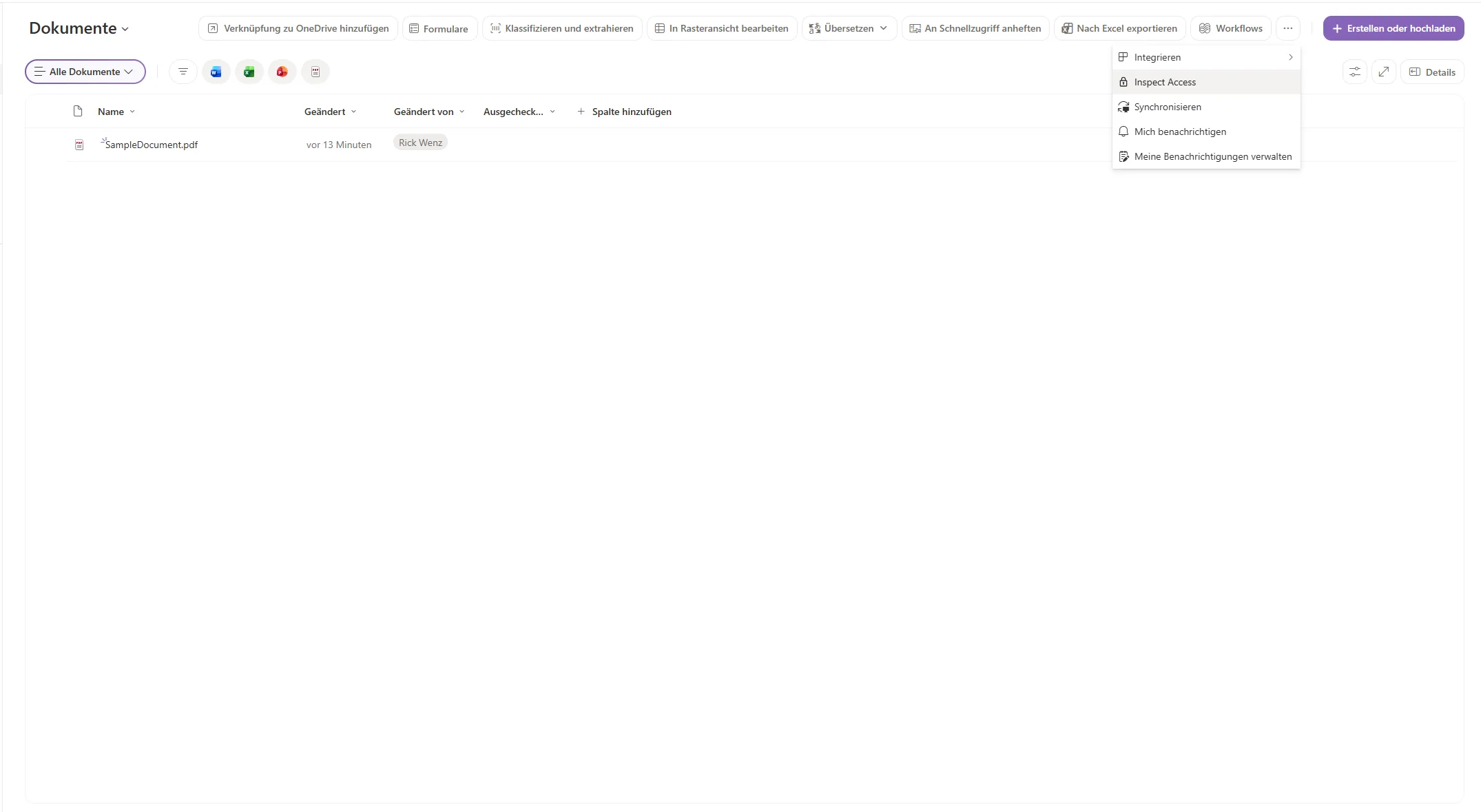
After installation, the sample adds an Inspect Access command to the command bar of a modern SharePoint document library. When the command is executed, a panel opens on the right side and shows a compact overview of the current permission setup.
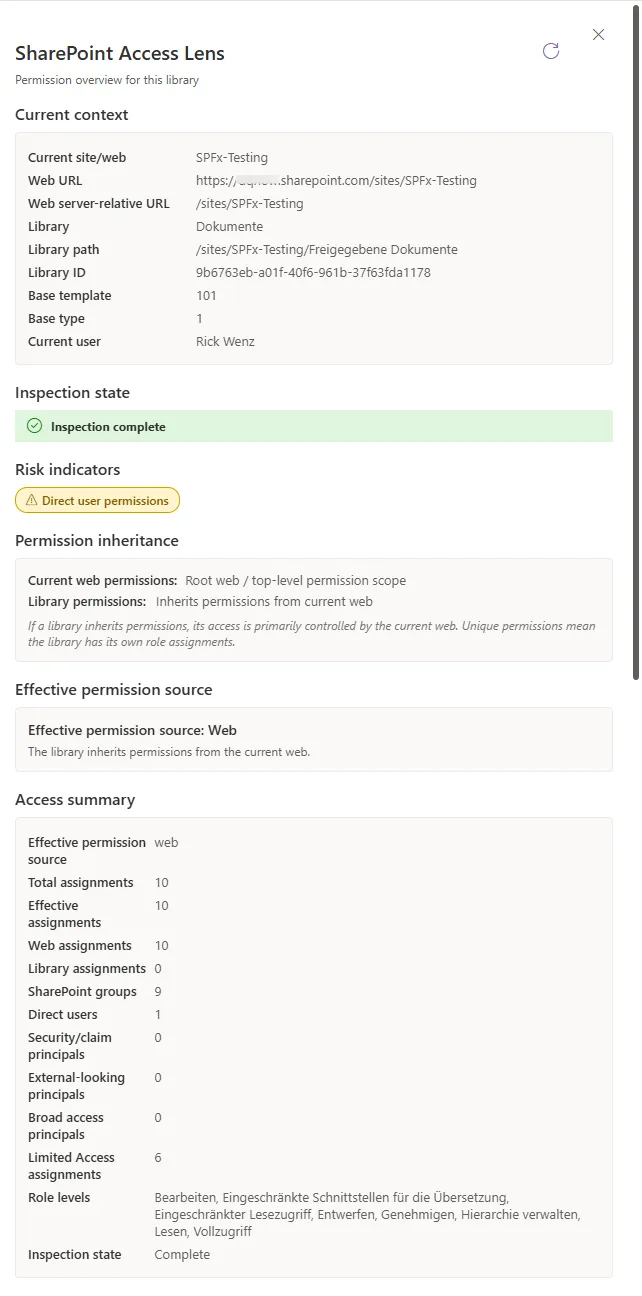
The sample shows, among other things:
- whether the current library inherits permissions or has unique permissions
- whether the effective role assignments come from the site or directly from the library
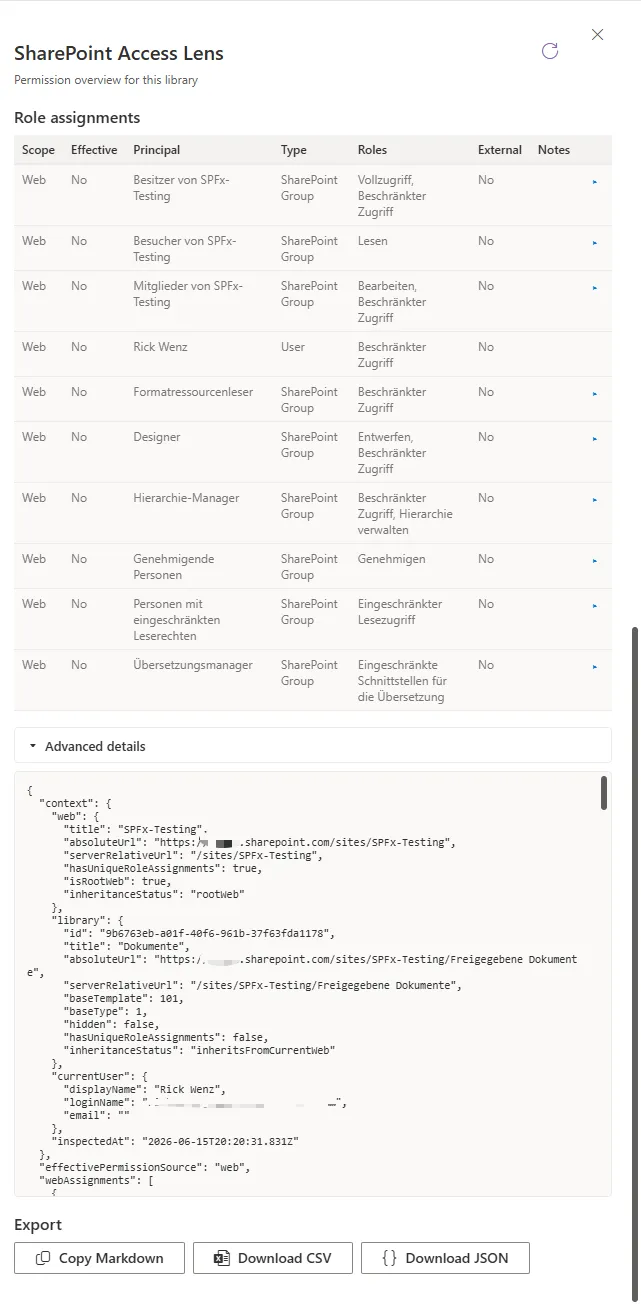
- which users, SharePoint groups, security groups or claims are visibly assigned permissions
- which SharePoint groups can be expanded when the current user has sufficient permissions
- which potentially relevant review indicators are detected
- whether the inspection was completed fully, partially or not at all
- export options as Markdown, CSV or JSON
One important goal for me was that the tool should not pretend to be a full security scanner. Access Lens is intentionally designed as a visibility and learning helper. It does not scan an entire tenant, a site collection, individual files or folders. It does not modify permissions and it does not replace a proper access review.
Why I built it
In many Microsoft 365 projects, you quickly notice that permissions are one of those areas where small uncertainties can have a big impact later.
A document library with unique permissions, direct user assignments or very broad groups is not automatically wrong. But these things are often a good reason to take a closer look. That is exactly why I wanted to build a sample that does not judge like an oversized compliance oracle, but instead gives developers and admins a fast and understandable overview.
It was also important to me that the sample remains lightweight:
- no Microsoft Graph API permissions
- no backend service
- no database
- no telemetry
- local export directly in the browser
- use of the current SharePoint context and the permissions of the current user
This makes the sample useful for learning more about SPFx ListView Command Sets, PnPjs and permission analysis in SharePoint.
Technical focus
From a developer perspective, the sample demonstrates several common SPFx concepts:
- building a ListView Command Set
- rendering a React panel from a command bar action
- reading web and list role assignments with PnPjs
- working with permission inheritance at web and library level
- classifying different principal types
- expanding visible SharePoint groups
- handling partial failures cleanly
- exporting results as Markdown, CSV and JSON
- protecting CSV exports against formula injection
The last point was especially important to me because export functionality is often underestimated. Even in a community sample, it is useful to show not only that something works, but also what developers should keep in mind when building similar features for real-world projects.
Limitations of the sample
Access Lens is intentionally limited in scope. It only checks the current web and the current document library. It does not inspect folder-level or item-level permissions and it does not scan an entire environment. External or broad groups are also only classified based on visible information and heuristic indicators.
That is intentional. The sample should remain transparent and should not create a false sense of security when the available data is incomplete.
Conclusion
For me, Access Lens was a great community project because it combines a very practical SharePoint topic with clean SPFx development. I hope the sample helps other developers build their own ListView Command Sets, use PnPjs more effectively or better understand permission overviews in SharePoint.
The sample is now available in the Microsoft 365 PnP Community repository:
https://github.com/pnp/sp-dev-fx-extensions/tree/main/samples/react-access-lens
Feedback, ideas and improvements are very welcome.